
Start with the indicator manual
Identify the output format, character encoding, line terminator, port settings, and whether readings are streamed or requested. Document any stability flags, units, error codes, and overload messages. Do not infer these details from a connector shape or one captured reading.
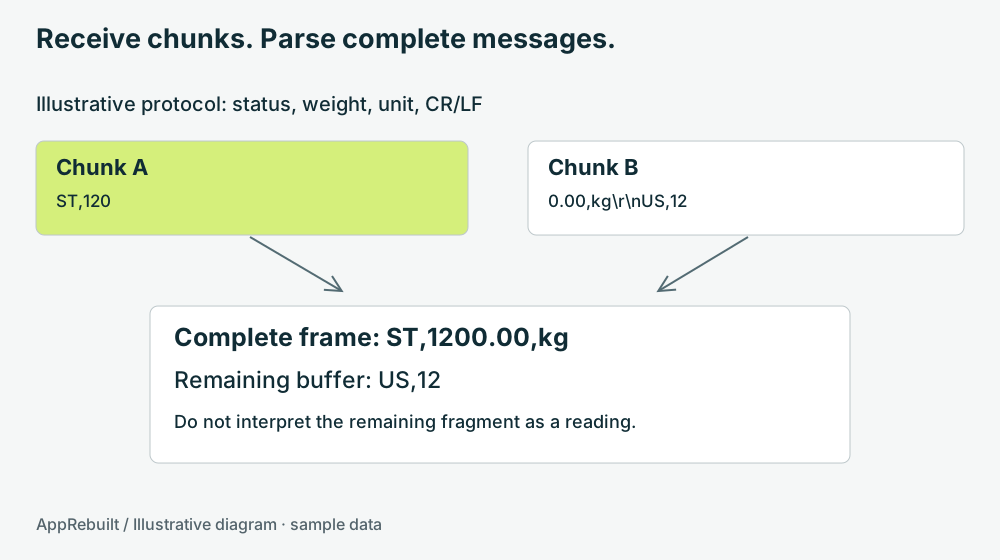
This tutorial uses the invented line format ST,1200.00,kg\r\n. It is suitable for explaining a parser, not configuring a production indicator. The two-second freshness limit below is also a teaching value; the real threshold must fit the device and process.
Keep incomplete data between reads
A receive event is not a guarantee that a complete device message has arrived. Microsoft's SerialPort documentation notes that DataReceived is not raised for every byte and runs on a secondary thread. Buffer incoming data and marshal UI changes appropriately in an implementation using that API. Microsoft: SerialPort.DataReceived behavior.
A single read may contain half a line, several lines, or the end of one and the start of another. Append the bytes to a bounded buffer, extract only complete frames, and retain the remainder. If the buffer grows beyond the protocol limit, reject or resynchronize according to a defined rule rather than allowing unbounded growth.
Teaching pseudocode — no device commands

on bytes received:
    append bytes to bounded buffer
    while a complete frame is available:
        remove one complete frame
        validate status, number, unit, and range
        if valid: save observation with receipt time
        if invalid: record a parse error
    retain the incomplete remainder
Validate the observation before allowing capture
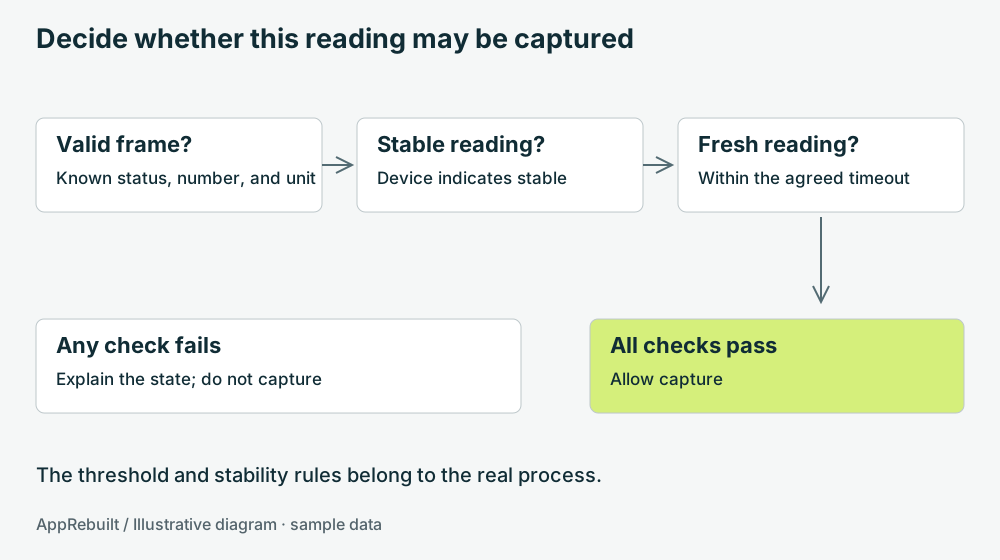
Parse numbers using the format the protocol specifies. Check units and distinguish an explicit device error from a valid measurement. A malformed number should not silently become zero. Keep the last valid reading separate from its age and current status.
A valid line can still contain an unstable weight. A stable value can become too old after a disconnected cable. Decide whether ticket capture requires all conditions to pass, and show the reason when it is blocked. In a real workflow, capture should use one consistent observation so a changed reading cannot slip between validation and saving.
Try the sample states
Sample reading inspector
This tool changes sample data only. It does not access ports or equipment.
ST,1200.00,kg\r\nNotice that incomplete input does not create a new reading. A timeout changes whether the last observation is usable; it does not change the historical value that was received.
Test recovery as well as normal input
- Split a valid message at every meaningful boundary and confirm the same parsed result.
- Feed two complete lines in one chunk and check that both are processed in order.
- Include an unknown status, invalid number, unsupported unit, and oversized frame.
- Stop input long enough to cross the agreed timeout.
- Reconnect and require a fresh valid observation before allowing a new capture.
- Repeat a capture action and verify the intended duplicate-prevention behavior.
Move from recorded sample messages to a controlled device test only after the protocol and environment are understood. Record the exact model and configuration used; one successful bench test is evidence for that setup, not every scale.