
Identify the actual connection
Record the manufacturer, model, firmware where available, physical interface, communication settings, and driver or SDK. The same product family can expose different options. A photograph of the model label and the relevant manual revision can prevent a scope built around the wrong device.
| Equipment | Questions to resolve |
|---|---|
| Scale or indicator | Continuous or requested output? What denotes stability, units, and overload? |
| Barcode scanner | Keyboard input or device API? Prefix/suffix? Focus behavior? |
| Label printer | Driver or command language? Label size? Feedback? Retry behavior? |
| PLC or gateway | Supported protocol? Addressing? Update rate? Timestamps and quality? |
Map the connection from the physical device to the stored record. Include converters, gateways, network paths, and services. A serial-to-USB adapter or a print-server change can affect installation and recovery even when the application screen is unchanged.
Separate transport from the business decision
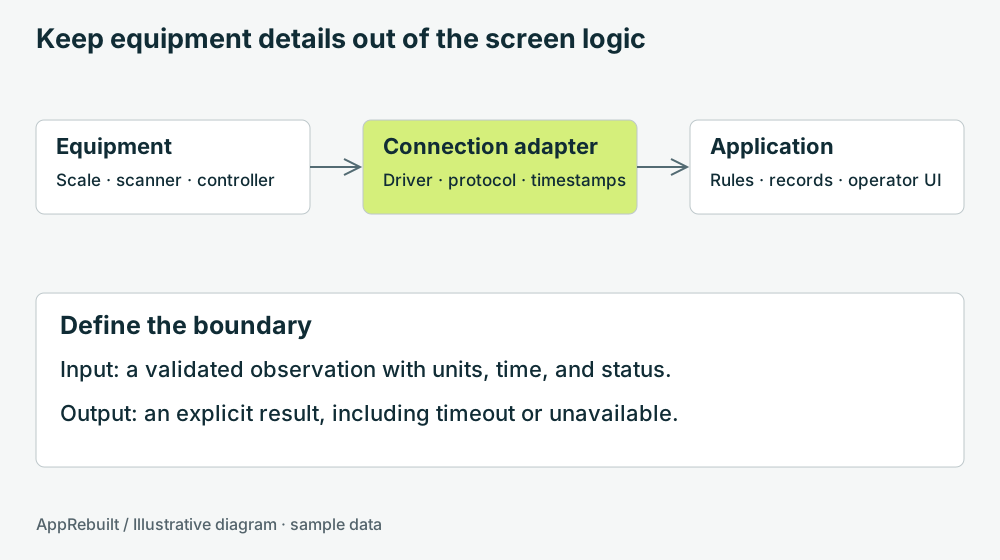
The connection layer should produce a meaningful result: value, unit, observation time, and status, or an explicit failure. Application rules then decide whether that result is acceptable for the current task. This keeps serial parsing and reconnect behavior from being scattered across button handlers.
Agree what “connected” means. An open socket or COM port does not establish that fresh, valid measurements are arriving. Record the last valid observation and define how the screen changes after a timeout. Do not make an absent measurement look like a genuine zero.
Treat receiving and printing as separate outcomes
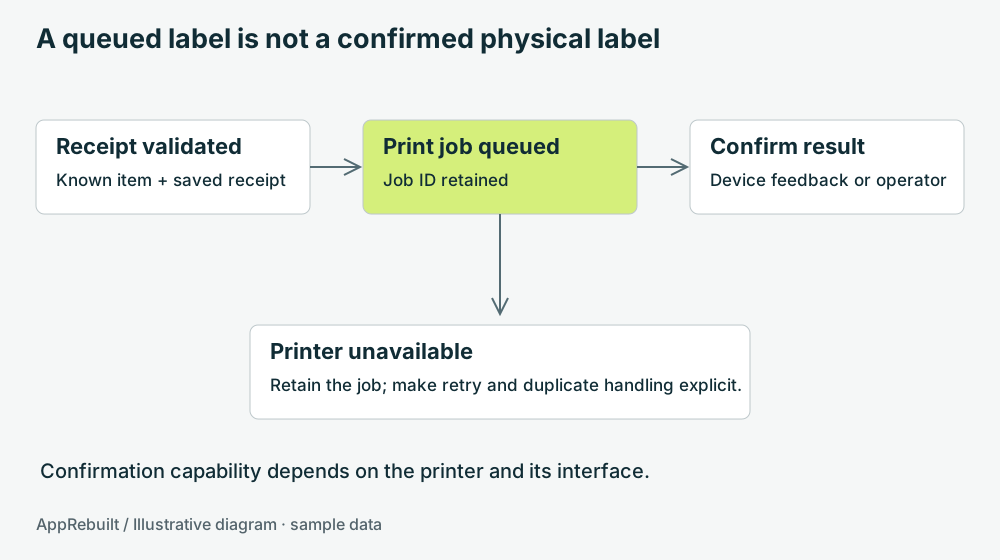
A software print call can report success at the stage it handles without establishing that the physical label is correct and attached to the intended item. For example, Microsoft's WritePrinter API describes writing bytes to the printer interface and reporting the bytes written. Design the business confirmation separately. Microsoft: WritePrinter API.
Decide whether confirmation comes from a supported device interface, an operator check, or a later barcode scan. Preserve a receipt identifier and print-job identifier. If a user retries after a timeout, make it clear whether the old job may still print.
Keep PLC monitoring scope explicit
OPC UA provides standardized mechanisms for industrial information exchange, including information modeling and security features. Whether it is available for a particular installation depends on the controller, server, gateway, and configuration. OPC Foundation: OPC Unified Architecture.
An older OPC DA installation does not automatically become a working OPC UA installation by changing the application. Identify the server and interface actually available. Include quality and timestamp handling in the monitoring requirements, and test how stale values appear.
Reading production counts is a different scope from issuing machine commands. These guides and website examples cover monitoring concepts. Control changes and safety functions require their own engineering scope and validation; they are not implied by an updated monitoring screen.
Exercise the awkward cases on a test setup
- Disconnect and reconnect at an agreed safe test point.
- Restart the application with the device unavailable.
- Send or replay malformed, partial, and duplicate sample messages.
- Change scanner focus and repeat a scan.
- Hold a print job, restore the printer, and check for duplicate output.
- Confirm that stale measurements cannot silently become new production records.
Document the observed result and the expected recovery action. Use the serial-scale tutorial for a concrete framing example, and the interactive comparisons to inspect sample operator states.